














Support · 28 answers · 28 fixes
Corded Dolphin: Troubleshooting.
The fixes for the problems owners report most: cycles, climbing, cleaning, power and connectivity.
Cleaning Performance
Cleaning Performance (11)
- How do I remove something stuck in my Dolphin Wave 90i tracks?Unplug the power supply before turning the robot over to check for trapped objects, and pull the tracks only halfway off.
- How do I clean a clogged impeller on my Dolphin Wave 90i?Unplug the power supply before opening your Dolphin Wave 90i to clear the impeller, and work carefully around its sharp blades.
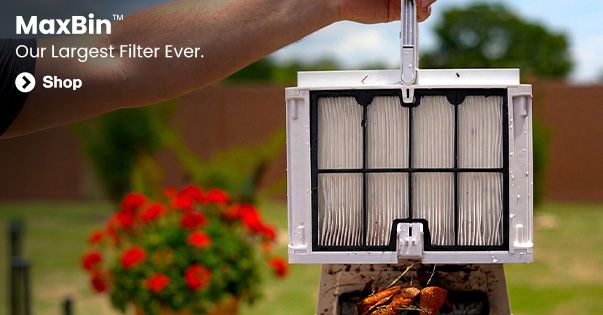
- How do I clean my Wave 90i filter?Thoroughly rinse both filter baskets, or empty and hose off the filter bag. Check the robot's springs for debris before reinstalling the baskets.
- How can I change the filter on my Wave90i?You can swap fine and ultra-fine basket panels, switch between the basket and filter bag, or replace the bag on your Dolphin Wave 90i.
- My impeller is clogged. How do I clean it?Unplug the power supply, open the impeller with a Phillips-head screwdriver, remove trapped debris, and reassemble it. Never use a power drill.
- Why does my Dolphin keep missing part of the pool?Check cable reach, start your Dolphin in the missed area, and check cycle length, filters, the impeller, tracks, and pool obstacles.
- My Dolphin's filter is full. How do I clean it?After each cycle, remove your Dolphin's filter basket or panels, rinse away debris with a garden hose, and reinstall them without waiting for them to dry.
- Why isn't my Dolphin cleaning the pool properly?Check the filters, clear debris blockages, verify water conditions and cable reach, and match the filter and brush to your pool.
- Why isn't the S1000/S2000/3000 reaching the steps?Use Full Coverage mode, confirm the sun ledge meets the 12–15-inch minimum water depth, and start about 3 feet from the steps.
- How do I replace the brushes on my Dolphin robot?Unplug the power supply, then follow the video and replacement steps for your Dolphin model and the front, middle, or rear brush.
- Why is debris falling out of my robot when I remove it from the pool?Lift by the handle, let the water drain, and check the filters and debris-return flap if debris keeps falling into the pool.
Movement & Cycles
Movement & Cycles (9)
- Why are my Dolphin’s tracks loose or falling off?Reinstall loose tracks and check your pool chemistry. Replace tracks that are faded and still slip off after these checks.
- Why won't my Dolphin climb walls or move sideways on walls?Check water temperature, chemistry, cleaning modes and filters, then inspect the impeller, handle position, cable length and brushes.
- Why won't my Dolphin robot start when the power supply works?Inspect the blue cable, restart the power supply using a different outlet, and check the impeller and tracks for blockages.
- Why won't my Dolphin finish a cycle, or why is the power supply light red?If your Dolphin stops early or the power supply shows a red light, first check whether the power supply shuts off when the robot stops.
- What should I do if my Dolphin gets stuck on the drain?Turn off the pool filter system during your Dolphin's cleaning cycle, since suction from the main drain can hold the robot in place.
- Why does my Dolphin float instead of sinking to the bottom of the pool?Soak any foam brush rings, release trapped air, and check that your pool's salt level is no higher than 5000 ppm.
- Why is my Dolphin doing wheelies?Wheelies help your Dolphin turn, but wheelies while moving forward or backward may signal trapped air, cable tension, or a maintenance issue.
- Why does my Dolphin get stuck at the bottom or deep end of the pool?Start by cleaning the filters, then check whether they need replacement, confirm balanced water with no algae, and check for drain snags.
- What should I do if my Dolphin's cable is twisted?Stretch the cable in the sun for at least 3 hours, then check water conditions, cable length, power supply placement, and wheel or track obstructions.
Power & Connectivity
Power & Connectivity (8)
- Why isn't my Dolphin power supply working properly?Check the outlet and cables, then test the power supply with the blue cable disconnected to help identify a power supply, cable, or motor issue.
- How do I connect my Dolphin to the MyDolphin app with Bluetooth?Pair through MyDolphin with Bluetooth and GPS on, keep your phone within 3 feet of the power supply, and allow up to 2 minutes.
- How do I connect my Dolphin to Wi-Fi with MyDolphin Plus?Pair your Dolphin through Bluetooth first, then connect it to a 2.4 GHz Wi-Fi network in MyDolphin Plus.
- Why is my Dolphin not responding or showing a communication error?Check the blue cable connection, then test the robot in the app; if the Communication Error returns, the robot needs repair.
- What should I do if my Dolphin remote control isn't working?Replace the batteries and use the remote within 3 meters of the robot's power supply before considering a replacement remote.
- Why can’t I access all the features on the power supply unit?Power supply features depend on your Dolphin model, even when the unit looks identical to one used with a different model.
- Why does my Dolphin's "full filter" light turn on when the filter isn't full?A filter that looks clean can still be clogged by dried particles, so check the impeller, clean the filters thoroughly, and reset the power supply.
- Why can I no longer connect to the MyDolphin Plus app?Check the app version, power supply and network settings, then follow the steps for your connection problem.
No answers match. Try a different word, or .
More support
Fixes by model, parts and manuals.
Troubleshooting by robotA problem-first guide for every Dolphin and Niya robot.Fix a problem
Replacement parts241 genuine parts with the robots each one fits.Find a part
Dolphin manuals and guidesUser manuals, quick-start guides and how-to videos.Find your manual
Every answerAll topics, searchable.Browse answers

